
Learning Objectives
Theory / Be able to explain ...
- Terminology like immutable, literal, sequences, slicing, comprehensions, keys, etc.
- The functional differences between lists, tuples, strings, dictionaries, and files
- The implications of files as sequential, persistent data stores
- The structure and use of absolute and relative file paths
Skills / Know how to ...
- Index and slice sequences
- Convert from one data type to another
- Select, open, read, write, and close files
- Use dictionaries for keyed data (with named fields)
Data Type vs Data Structure
- A Data Type defines a set of requirements:
- Kinds of data to be encapsulated (contained)
- Operations to be supported (applicable)
- A Data Structure is a particular implementation of a Data Type.
- There is no practical difference (unless you happen to be building your own data structures). We will use the terms interchangeably in this course.
The Standard Data Types
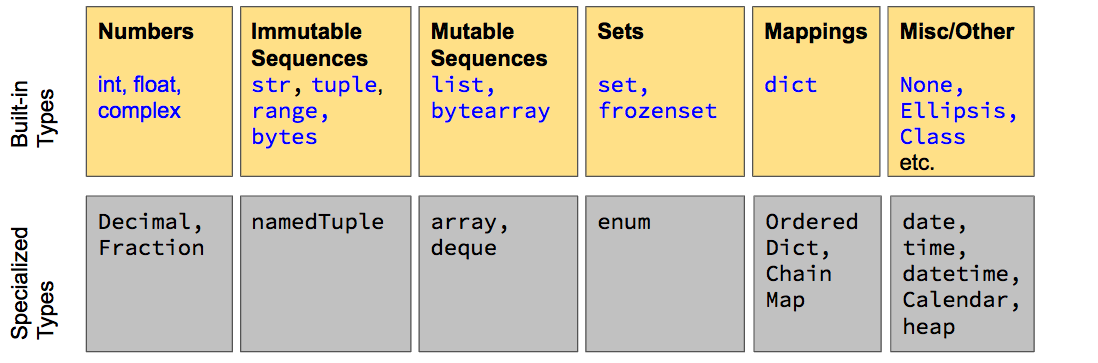
- Built-in types work without an
import. They are also reserved words! - Specialized types require
importbut not an install. - For more, RTFM the Python Standard Library docs
Lists should be passé by now
- Can store sequences of values of any type
- List items can have different (mixed) types
- Indexed by integer locations (starting at [0])
Some new things to try ...
- Slicing to index subsets of lists
- Nesting lists inside other lists to simulate matrices (with [i][j] indexing)
- Add, remove, replace items as needed
- Concatenate lists with other lists
- Test membership (search for) an item in a list
List Membership & Scanning
We can test for whether a given value is found in a list:
2 in [1,2,3,4] # Is 2 in the list?
0 in [1,2,3,4]
We can even scan for a value’s first occurrence:
[1,2,3,4].index(3) # In what position is 3?
List Slicing
We can generate subsets of lists (or other sequences) using slicing
alist[start_index : end_index]
start_indexis the index of the first item to include- leave blank to start the slice from 0
end_indexis the index just after the slice you want- use
-1to indicate the last index on the list,-2the next to last, etc. - use blank to include everything up to the very end of the list
- use
numbers = [1,"two",3.0,(1+1+1+1)]
numbers
numbers[1:2]
numbers[:2]
numbers[:-1]
numbers[:-2]
Nested Lists
Try this yourself, one line at a time:
bunch = ["Mike", "Carol", ["Greg","Marcia", "Peter", "Jan", "Bobby", "Cindy"]]
bunch[2]
bunch[3]
bunch[2][1]
bunch[2][1][2]
bunch[1]
bunch[1][1]
bunch[1][1][1]
bunch = ["Mike", "Carol", ["Greg","Marcia", "Peter", "Jan", "Bobby", "Cindy"]]
bunch[2]
bunch[3]
bunch[2][1]
bunch[2][1][2]
bunch[1]
bunch[1][1]
bunch[1][1][1]
Add, Replace, Delete, Insert
# Add / Append
area_codes =  [212,646]
area_codes += [347, 718, 917, 929]
area_codes
# Replace
area_codes[2] = 110
area_codes
# Delete
del area_codes[2]
area_codes
# Insert
area_codes[2:2] = [347]
area_codes
Accumulator Pattern (again)
- Problem: Need to mark progress (remember things) as we traverse a list.
- Solution: Update an accumulator variable each time we access a list item. Use the += assignment operator.
sum=0    # numerical accumulator variable
cpy=[]   # list accumulator variable

for v in [2, 5, 2]:
    sum += v    # same as sum = sum + v
    cpy += [v]  # same as cpy = cpy + [v]
print(sum,cpy)
List Creation from Other Sequences
We can create a copy of any sequence with the list() conversion function (like int(), float(), str())
list( (1,2,3)) # from a tuple (more in a few minutes)
list("abcd") # from a string (more in a few minutes)
list(range(4)) # from a range generator function
List Comprehensions
- A comprehension is a custom sequence built item by item from another sequence.
- The most common form is a list comprehension
[ < output exp > for < item > in < orig seq > if < boolean exp > ]
# Note that keywords for/in/if are used to separate the clauses
- Example
[i for i in range(1,x+1) if int(x/i)==x/i]
- Step-by-step
- The for loop iterates item-by-item over the original sequence
- If the boolean expression is true for the current item then generate the output item
- Append the output item to the new list
x=100
# Use an accumulator to build a list of factors
factors=[]                 # initialize an empty factors list
for i in range(1,x+1):
  if int(x/i)==x/i:        # test for divisibility (no remainder)
    factors += [i]         # add to factors list
print(factors)

# Now do it with a list comprehension
factors=[i for i in range(1,x+1) if int(x/i)==x/i]
print(factors)
Append vs Concatenate
- Appending
list2tolist1modifieslist1 - Concatenating
list2tolist1creates a new list
# create two lists
list1 = [212,646]
list2 = [347,718,917,929]
list1 + list2 # Concatenate list2 to list1
list1 # unchanged
list1 += list2 # Append list2 to list1
list1 # changed
What's a Tuple?
A tuple is a fixed (literal) sequence of items enclosed with parentheses (instead of square brackets).
- [1,2,3] is a list
- (1,2,3) is a tuple
You've already seen them in math class:
- (1,2) is an ordered pair (tuple)
- (1,2,3) is an ordered triplet (tuple)
- (1,2,3,4) is an ordered quartet (tuple)
- Higher dimensions (n > 4) are n-tuples.
Tuples work just like lists except they are immutable: their contents cannot be modified in any way after creation.
Tuple Examples
x = (1,2,3)
print(type(x), x)
y = [1,2,3]
print(type(y), y)
z = tuple(y)
print(type(z),z)
(1,2,3) + (4,5) # Concatenate tuples
x += (4,5) # Append tuples works but actually creates a new tuple
x
(1,2,3)[:-1] # Slicing works fine
( i*(i-1)/2 for i in range(10) ) # Comprehensions don't quite work though
                                 # Warning: it doesn't throw an error!
Aside: We've seen Tuple-like lists before
Go back and look at function definitions again:
def add_two_numbers(a,b)
    return a+b
The parameter definitions are actually tuple-like:
- Syntax is the same, with enclosing parentheses
- Parameters can't be added/deleted after the function is defined
- Caveat: functions calls can have variable numbers of arguments when called using some tricks that are beyond scope here.
x =(1,2)
y = x        # y is a copy of x
x += (3,4)   # modify x
print(x)
print(y)
Mutables (like lists) make aliases
If we modify the original list we also modify the alias list
x = [1,2]
y = x      # y is an alias for x
x += [3,4] # modify x
print(x)
print(y)
String Literals
String values are said to be literals (like tuples). When displayed in the interpreter they are always shown with quotes:
"ABC"
Three kinds of string literals:
- Single quoted literals are like
'ABC' - Double quoted literals are like
"I can say 'ABC'" - Triple quoted literals
'''can span
multiple lines.'''
Strings as Tuples with Added Syntactic Sugar
- Any operation you can do with a tuple you can do with a string
- There are some extra things strings can do as well, but they are still fundamentally just tuples of characters.
tuple("ABC")
"ABC"[1]
"ABC" + "DE"
"ABC" += "DE"
String Methods
Strings get all of the tuple methods for free. However, they also come with lots of additional built-in methods. (RTFM.)
upper(),lower(),capitalize()strip(),lstrip(),rstrip()center(),ljust(),rjust()count(),find(),rfind(),index(),rindex(),replace(),format()
Once again: Strings are no more editable than tuples. upper(), strip(), etc. just return new strings.
Splitting/Joining Strings
We can split a delimited string into a list of items
"a,b,c".split(",") # produces ['a','b','c']
We can also do the reverse, building a delimited string from a list of items.
",".join(['a','b','c']) # produces 'a,b,c'
String Comparisons
Many of the relational comparisons that apply to numbers also apply to strings using lexicographic ordering.
"XYZ" == "ABC"
"ABC" < "XYZ"
"XYZ" < "ABC"
String Traversal with for Loops
This works exactly like a tuple, list, or any other sequence:
s = "ABC"
# use s like a tuple or list
for c in s:
    print(c)

# does the same thing but more verbose
for i in range(len(s)):
    print(s[i])
This should be no surprise since strings are just a special kind of sequence.
String Traversal with while Loops
while loops work just like before.
s = "ABC"
i = 0
while i < len(s):
    print(i,s[i])
    i += 1
We can, of course, do lots more inside the loop body. This is just an example.
Digression on in (and not in)
We have already seen in used in for loops
for c in s:
    print(c)
Technically, the 'c in s' part of the for loop header is actually a boolean expression that can be used to test if the value of variable c is inside the sequence s.
It works fine with literals as well:
"B" in "ABCD"     # True
"B" not in "ABCD" # False
1 in [2,1,3]      # True
Regular Expressions for Advanced Pattern Matching
Regular Expressions (regex) are a very, very old idea first explored in the early 1950s.
- A regex is a pattern of characters that we are looking to match within a base string.
- Python has built-in support using the
restandard library. - The syntax for defining patterns is extremely complex and not very user-friendly. It's often best to RTFM each time you use the Python re library.
import re
# the string to be searched; in this case a slightly mangled line of course info
base_string = "34379,AY,0010,01,Intro Four-Field Anthropology,3 TF 1100-1215pm,Lacy S,WDIV"
# the regex pattern; compiled before use
pattern = re.compile('(TBA|[Bb]y [Aa]rrangement|[Oo]nline|[MTWRFSU]+ [0-9]{4}-[0-9]{4}[PpAa][Mm])')
# find all pattern matches in the base string; returns a list of strings
timecodes = pattern.findall(base_string)
timecodes
- We'll come back to regular expressions later in the course.
Lists → Dictionaries
Dictionaries are a lot like lists:
- Can store a collection of items
- Each item can be just about anything
- Can add, delete, modify items as needed
However, instead of using numerical indexes (0, 1, 2, ...), dictionaries use keys, which can be any imutable type (though we usually use strings). We can even use integer keys, just like a list.
Using Dictionaries
Instead of [ and ], dictionaries are bracketed with { and }:
{ <key-1> : <value-1>, <key-2> : <value-2>, ... }
Each key:value pair represents one term in the dictionary:
- The keys are then used to refer to items in the dictionary, just like we use indexes for lists.
For example,
nums = {'one':1,'two':2,'three':3}
nums['one']
We can even use integer keys, just like a list.
listlike_dict = {1:'a',2:'b',3:'c'}
listlike_dict[2]
An Aside About Keys and Hashing
- Keys must be unique and hashable.
- A hash function converts arbitrary data (numbers, strings, etc.) to a digest of fixed length. For example, let’s use the standard
md5hash function on ‘Go Stags!’:
import hashlib
hashlib.md5(b'Go Stags!').hexdigest()
- If you've ever created a cryptographic certificate or RSA key, then you've seen a digest (or two).
- While digests are not guaranteed to be unique for every possible data, odds of duplicates are very low.
- So what? Digests are used to make sure that the keys are unique (regardless of data type).
Add, Replace, Delete (but not Slice)
nums = {'one':1,'two':2,'three':3}
nums['four'] = 4  # add a key-value pair
nums
nums['four']= 5 # Replace an item
nums
del nums['four'] # Delete an item
nums
nums['one':'four'] # An attempt to slice
Aliasing and Copying Work Too
nums = {'one':1,'two':2,'three':3}
ints = nums     # ints is an alias of nums
ints
del nums['three']
ints
ints = dict(nums)    # ints is a copy of nums
nums['three']=3
ints
Iterating with for Loops
Dictionaries come with a few methods designed to make iteration really simple:
nums = {'one':1,'two':2,'three':3}
print(nums.keys())
print(nums.values())
for (k,v) in nums.items(): # steps through each key:value pair
    print(k, "maps to", v)
FYI: the (k,v) in the for loop is a tuple. Each pass through the loop gets a fresh (k,v) tuple.
nums = {'one':1,'two':2,'three':3}
print(nums.keys())
print(nums.values())
for (k,v) in nums.items():
    print(k, "maps to", v)
Pro Tip: Use the zip() Function
The zip() function matches up corresponding items in two equal-length lists to generate key-value pairs.
columns = ['first_name', 'last_name']
dict( zip(columns, ['Al','Gebra']) )
dict( zip(columns, ['Betty','Boop']) )
Lists + Dictionaries = Data Tables
Most datasets are organized into tables. Consider, for example, the typical CSV file:
- The top line (row) names a few columns as a comma-separated list
- Each row below contains the data as a comma-separated list of values (CSV) in the same order as the columns
This suggests a simple data structure:
- Each row is represented by a dictionary with the column names as keys
- The full table is then a list of dictionaries in the the order they appear in the file.
columns = ['ID','Waist','Hip','Gender']
table = []
table += [dict(zip(columns,[1,30,32,'M']))]
table += [dict(zip(columns,[2,32,37,'M']))]
table += [dict(zip(columns,[3,30,36,'M']))]
table
Persistent State & Files
- Data is persistent if its state (value) outlives the process that created it.
- If you restart the Python interpreter (or your computer), all data in memory is lost but any data in storage persists.
- Persistent data generally resides within files.
- Even if your data is managed by a relational database or online in the cloud, it ultimately will reside in one or more files.
- Files are logically sequential, meant to be read and written to one bit at a time. (We can simulate random access by skipping ahead or backwards but its all still linear.)
File Hierarchy and Paths
- When opening a file we have to tell Python where to look for it in storage.
- Files in storage are logically organized into a hierarchy (tree) of folders and files.
- A file path gives directions for navigating the tree to a folder or file. The path from the root of the tree to a specific file is called the absolute path.
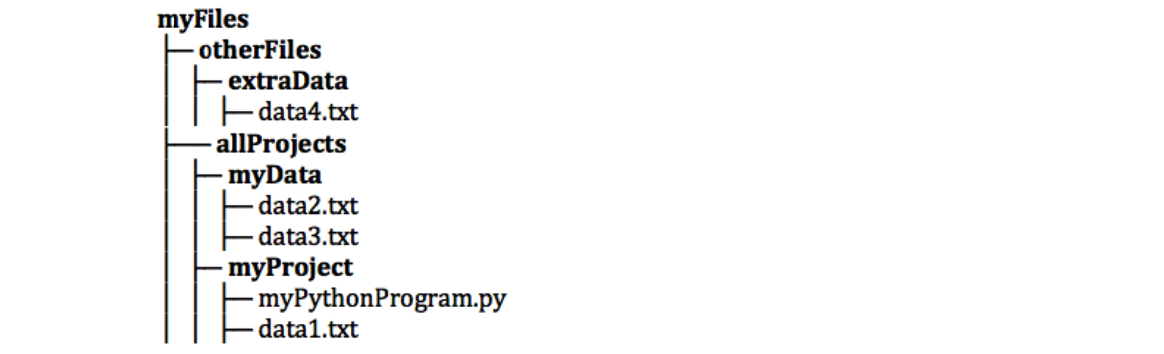
Relative Paths
A relative path navigates to the file from where your Python program resides.
data1.txt../MyData/data2.txt../../otherFiles/ExtraData/data4.txt
Each segment of the path is an instruction:
- Go down into a subfolder:
<subfolder name>/ - Go up a level of the tree:
../ - Go to a file in the current folder:
<file name>
Try it: For each path at the top of the slide, say exactly what navigation directions are being given.
Caveat about Windows
Due to a poor design decision by IBM in the early 1980s, Windows uses \ (backslash) instead of / (slash) in its file paths.
In modern versions of Windows, slash and backslash can be used fairly interchangeably. However, there are bugs ...
Fortunately, Python's os and os.path libraries provide utilities for using OS-independent (canonical) paths in your code.
An example in a JupyterLab Terminal
In JupyterLab launch a new Terminal tab.
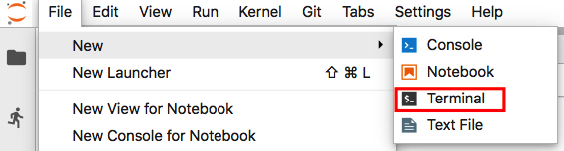
- What you see in your terminal session will be different due to operating system differences.
- This demo is in MacOS X, which is really a fancy GUI on top of BSD Unix.
- MS Windows, notably, does not follow Unix (POSIX) standards. You can install "Git Bash" to make it work more like a proper Unix terminal.
Check to see where we are on the disk.

bash-2.3\$ is a prompt from the Bash 'shell'. Bash is yet another language (complete with variables, loops, conditionals, etc.) that is commonly used for terminal sessions on Unix systems.- We are always in a folder somewhere on the drive. Bash keeps track of our present location.
pwdis a bash command to display the present working directory.

See what's inside the HealthStatsProject folder.

- We can pass a path argument to
lsto see things in other folders. In this case the path is a subfolder of the current folder. - The current folder's path is
.(dot) (or if you prefer,./). If no path is supplied thenlsassumes you meant./.
Go down into the HealthStatsProject folder.

- To change folders we use the
cd(change directory) command, again supplying a path. cdwithout a path argument returns us to the user's home folder.
Take a peek back to the parent folder

- The parent folder's path is
..(dot-dot). - We can go up two levels by chaining the dots:
../../
Opening and Closing Files
- The
open()function returns a Python object that we can use to read or write data from/to a file. - The
close()method closes it when we are done.
f_in=open(<filepath>,"r") # open for reading
    # read data
f_in.close() # close the file when done reading
f_out=open(<filepath>,"w") # open for writing
    # write data
f_out.close() # close the file when done writing
Bug alert!
To avoid data corruption, never open a file for reading and writing at the same.
Reading Lines from a Text File
- All at once as a list of strings (one string per line):
lines = list(f)
- Using a
forloop:for current_line in f: # do something with current_line
- Using
readline()orreadlines():readline() # read the next line readlines(n) # read up to the next n lines
Handling Delimited Lines
Each line of the file is a string. Typically, a data file will use a delimiter character like a tab, space, or comma to divide each line (string) into fields:
- ID,Waist,Hip,Gender
- 1,32,40,M
We use the string split() method to generate a list of strings (one per field) for each line.
fields = line.split(',')
The string for the last field on a line will have a newline character (or two!) at the end. You'll need to strip that out yourself. (RTFM.)
Writing Text Files
Writing to a text file is similar to reading from one, except that you have to explicitly write a newline character \n at the end of each line.
f=open("myfile.txt","w")
f.write("a line of text\n")
f.close()
Bug Alert!
Always, always, close the file when you are done writing. File systems write data in chunks instead of one character at a time. Closing the file forces Python to write the last chunk.
with Statements
To avoid ever forgetting to close a file, use a with statement:
with open(<filepath>) as <file alias>:
    # do something with the file
For example ...
with open("myfile.txt") as f:
    f.readline() # read the first line
Python automatically calls close() for us at the end of the with statement body.
Classwork (Start here in class)
- RSI Chapter 11 (Files)
- Health Stats Part 2
- Course Catalog Demo Part 1
- If time permits, start in on your homework
Homework (Do at home over Fall Break)
The following is due before class next week:
- Any remaining classwork from tonight
- Complete DC Git "Repositories" chapter (if you haven't already)
- Course Catalog Demo Part 2 (posted next week)
- Start DC "Cleaning Data in Python" course
- Quiz 2 (online on October 9)
Please email chuntley@fairfield.edu if you have any problems or questions.